
AI PLATFORM FOR BUSINESS
AI Assistants for
Customer Communication
Customer Communication
Frees up 80% of the team’s time and works 24/7
Handles incoming requests, qualifies leads, schedules meetings, and passes the most important information to an operator.
8 ready-made scenarios for your business
Launch in 5 minutes
Works in Instagram, WhatsApp, and on your website

MAIN CONVERSION FACTOR
First response speed decides everything.
The slower a company responds, the faster the customer goes to competitors.
Here’s what the research shows.
Here’s what the research shows.
If 8 out of 10 companies are already implementing AI agents or planning to do so, it’s at least worth trying.
01
1
minute
+391% increase in sales conversion
when the first contact happens within the first minute after a request
02
2
minutes
160% increase in lead conversion
the effect is already almost 2.5 times lower than responding within 1 minute
78%
of customers
buy from the company that responds first.
03
5→10
minutes
4x lower chance of getting a response
when replying after 10 minutes instead of within the first 5 minutes
04
10→30
minutes
100x lower chance of making contact
after 30 minutes, it becomes much harder to simply get a response
How an AI assistant works with your customers every day
Four scenarios where SkaiChat handles most tasks — leaving the team only the complex or most important cases.
Handles requests 24/7
A customer writes in Telegram, WhatsApp, or on the website at any time.
The AI replies within seconds, understands the question, and uses the company’s knowledge base.
If the answer is available, it gives it immediately.
If the question is complex or the customer is frustrated, it immediately calls an operator and preserves the context of the conversation.
The AI replies within seconds, understands the question, and uses the company’s knowledge base.
If the answer is available, it gives it immediately.
If the question is complex or the customer is frustrated, it immediately calls an operator and preserves the context of the conversation.
Turns inquiries into qualified leads
Asks one qualification question at a time — not as a list, but in a natural conversation:
what the company does, what the budget is, when the solution is needed, and who makes the decision.
At the same time, it answers the customer’s questions using the knowledge base.
At the end, it collects contact details and fills out the lead card in the CRM.
what the company does, what the budget is, when the solution is needed, and who makes the decision.
At the same time, it answers the customer’s questions using the knowledge base.
At the end, it collects contact details and fills out the lead card in the CRM.
Books meetings without an administrator
Checks available slots in Google Calendar or Calendly, offers 2–3 time options, and books the selected one.
Sends the customer a confirmation and sends the owner a notification.
If the case is non-standard — a special time, a complex request, or a second cancellation in a row — it hands the conversation over to the administrator.
Sends the customer a confirmation and sends the owner a notification.
If the case is non-standard — a special time, a complex request, or a second cancellation in a row — it hands the conversation over to the administrator.
Guides the customer from question to payment
Helps choose a product, answers questions about specifications and availability, and handles objections using standard scenarios.
Sends a payment link.
After payment, it automatically sends the customer a confirmation, creates the order in the CRM, and notifies the team.
Sends a payment link.
After payment, it automatically sends the customer a confirmation, creates the order in the CRM, and notifies the team.
PLATFORM TASKS
What SkaiChat is suitable for

01
01
Sales and qualification
The assistant answers questions, clarifies initial details, and guides the customer to the next step.

02
02
Customer support
Handles typical requests automatically and transfers non-standard cases to an operator.

03
03
Knowledge base
Employees receive answers based on documents, regulations, and training materials.

04
04
Product catalog
The assistant uses the catalog and uploaded materials to provide accurate product answers.

05
05
Messengers
Systematic handling of inquiries in Instagram, WhatsApp, Facebook and Telegram

06
06
CRM scenarios and operational processes
Requests and inquiries are embedded into the company’s existing workflow through CRM integrations.
Eight ready-made goals — choose what your AI agent should do
An agent’s goal is not a “role” from a set of templates. It is a specific, measurable outcome: booked, sold, qualified. Each goal comes with a ready-made scenario that you can adapt to your business in 5 minutes.
Collect a lead
The agent turns incoming interest into a completed lead card.
Suitable for: B2B services, consulting, agencies, real estate, IT outsourcing, legal services.
Transfers to an operator: if the lead is hot, the request is non-standard, the customer is frustrated, or asks to speak to a human.
Suitable for: B2B services, consulting, agencies, real estate, IT outsourcing, legal services.
Transfers to an operator: if the lead is hot, the request is non-standard, the customer is frustrated, or asks to speak to a human.
Answer the customer
The agent answers typical questions and helps solve issues using the knowledge base.
Suitable for: SaaS products, online services, online schools, customer support.
Transfers to an operator: if the issue is not resolved, the customer contacts again, there is a complaint, or the problem is urgent.
Suitable for: SaaS products, online services, online schools, customer support.
Transfers to an operator: if the issue is not resolved, the customer contacts again, there is a complaint, or the problem is urgent.
Book a meeting
The agent finds a convenient time, books a slot, and sends a confirmation.
Suitable for: clinics, beauty salons, fitness clubs, private specialists, service companies.
Transfers to an operator: if a non-standard slot, rescheduling, cancellation, or preliminary consultation is needed.
Suitable for: clinics, beauty salons, fitness clubs, private specialists, service companies.
Transfers to an operator: if a non-standard slot, rescheduling, cancellation, or preliminary consultation is needed.
Sell directly
The agent helps choose a product, handles objections, and guides the customer to payment.
Suitable for: online stores, online courses, info products, fixed-price services.
Transfers to an operator: if the deal value is high, individual terms are needed, or a contract/manual approval is required.
Suitable for: online stores, online courses, info products, fixed-price services.
Transfers to an operator: if the deal value is high, individual terms are needed, or a contract/manual approval is required.
Qualify and route
The agent identifies the request type and sends it to the right department.
Suitable for: companies with multiple business lines, retail, insurance, HR, legal and financial services.
Transfers to an operator: if the request cannot be classified, the customer is VIP, or explicitly asks for a human.
Suitable for: companies with multiple business lines, retail, insurance, HR, legal and financial services.
Transfers to an operator: if the request cannot be classified, the customer is VIP, or explicitly asks for a human.
Guide through the first steps
The agent supports a new user until they reach the first result.
Suitable for: SaaS, online schools, services with registration, setup, or team onboarding.
Transfers to an operator: if the customer gets stuck, does not complete a step for several days, reacts negatively, or is important for the business.
Suitable for: SaaS, online schools, services with registration, setup, or team onboarding.
Transfers to an operator: if the customer gets stuck, does not complete a step for several days, reacts negatively, or is important for the business.
Collect feedback
The agent collects feedback after a purchase, visit, service, or product use.
Suitable for: service businesses, education, healthcare, e-commerce, B2B services, customer support.
Transfers to an operator: if the rating is low, there is a complaint, or a critical comment.
Suitable for: service businesses, education, healthcare, e-commerce, B2B services, customer support.
Transfers to an operator: if the rating is low, there is a complaint, or a critical comment.
Custom scenario
A custom scenario for a task that is not covered by ready-made templates.
Suitable for: non-standard processes, internal procedures, complex logic, CRM and database integrations.
Transfers to an operator: according to your rules: when there is a risk of error or a non-standard request.
Suitable for: non-standard processes, internal procedures, complex logic, CRM and database integrations.
Transfers to an operator: according to your rules: when there is a risk of error or a non-standard request.
Sales team
Key tasks: qualification, meeting booking, and reactivation of cold leads.
What the agent does:
Qualifies inbound leads
Books demos or meetings with a manager
Reactivates cold leads through outreach campaigns
Collects feedback after a deal
A potential customer submits a request via Telegram, the website, or a contact form.
The AI agent immediately starts a conversation and gradually collects the key information:
The AI agent immediately starts a conversation and gradually collects the key information:
- what the customer’s request is;
- what company they represent and what it does;
- the scope of the task;
- the required timeline;
- whether there is a budget or target cost range;
- who makes the decision;
- what next step is convenient for the customer.
Marketing team
Key tasks: lead generation, nurturing, segmentation, and feedback.
What the agent does:
Generates leads on landing pages and social media
Nurtures cold leads through conversation
Segments the audience by interests and ICP
Runs A/B tests of scenarios and messages
A visitor comes from an ad, website, Telegram channel, or social media and shows interest in a product or service.
The AI agent immediately starts a conversation and collects the key information:
The AI agent immediately starts a conversation and collects the key information:
- what exactly caught the user’s interest;
- what problem they want to solve;
- which format or product fits them best;
- how urgently they need the result;
- whether they are ready to leave contact details or move to the next step.
Service and support team
Key tasks: handling requests 24/7, answering typical questions, and escalation.
What the agent does:
Handles requests 24/7 in chats
Answers typical questions using the knowledge base
Transfers complex cases to an operator with a conversation summary
Provides analytics by request type
A customer writes in Telegram, WhatsApp, or a chat widget with a question, error, or complaint.
The AI agent immediately starts a conversation, clarifies the issue, and checks whether it can be resolved using the knowledge base:
The AI agent immediately starts a conversation, clarifies the issue, and checks whether it can be resolved using the knowledge base:
- what exactly happened;
- where the problem occurred;
- when the error appeared;
- what the customer has already tried;
- how urgently the issue needs to be resolved;
- whether an operator is needed or the issue can be closed automatically.
HR
Key tasks: candidate screening, employee FAQ, onboarding.
What the agent does:
Qualifies inbound leads
Books demos or meetings with a manager
Reactivates cold leads through outreach campaigns
Collects feedback after a deal
An employee, candidate, or new team member writes to the HR bot with a question about a vacancy, vacation, documents, onboarding, or internal policies.
The AI agent immediately clarifies the request type and finds the relevant information in the knowledge base, policies, or HR documents:
The AI agent immediately clarifies the request type and finds the relevant information in the knowledge base, policies, or HR documents:
- what topic the question is about: vacancy, vacation, health insurance, documents, adaptation;
- who is asking: a candidate, employee, or new hire;
- what status or stage is currently relevant;
- which document, instruction, or template is needed;
- whether an HR manager needs to be involved.
Internal communications
Key tasks: corporate documentation, policies, and answer search.
What the agent does:
Finds answers in corporate policies and procedures
Helps with accounting, legal questions, and IT access
Sends notifications about new policies
Provides analytics on the most frequently asked questions
An employee writes in the internal chat with a question about policies, documents, access rights, business trips, accounting, or legal procedures.
The AI agent identifies the topic of the request and searches for the answer in the corporate knowledge base:
If the request is non-standard, it transfers the case to the right department with a brief summary of the situation.
The AI agent identifies the topic of the request and searches for the answer in the corporate knowledge base:
- which policy or document is needed;
- which department the question relates to;
- what procedure is relevant;
- whether a template, instruction, or link is needed;
- whether a specialist needs to be involved.
If the request is non-standard, it transfers the case to the right department with a brief summary of the situation.
HOW IT WORKS
Launch in 5 minutes — no developers needed
1
Create an assistant
Define the agent’s role: sales, support, training, or internal assistance.
2
Upload knowledge
Add documents, FAQs, policies, and product data.
3
Connect channels
Set up Instargram, WhatsApp, and CRM integrations.
4
Launch conversations
The assistant responds, while your team sees all conversations in a single interface.
5
Connect an operator
An operator can take over the conversation without losing context.
Why it’s not just a bot
Why it’s more than a chatbot
With Skaichat, you can build an AI assistant for a specific business role, define its behavior, connect your knowledge base, communication channels, and business workflows — and manage every conversation from one centralized workspace.
Instead of a standalone bot widget, you get a practical AI tool designed for real business operations: sales, customer support, employee training, consulting, and internal processes.
Instead of a standalone bot widget, you get a practical AI tool designed for real business operations: sales, customer support, employee training, consulting, and internal processes.
Natural conversations
No rigid scripts — just context-
aware dialogue.
aware dialogue.
Knowledge-based answers
Uses documents, guides, policies, and catalogs to generate accurate responses.
Centralized workspace
Manage conversations, leads, and operators in one place.
Human handoff
Transfer conversations to an operator without losing context.
INTEGRATIONS
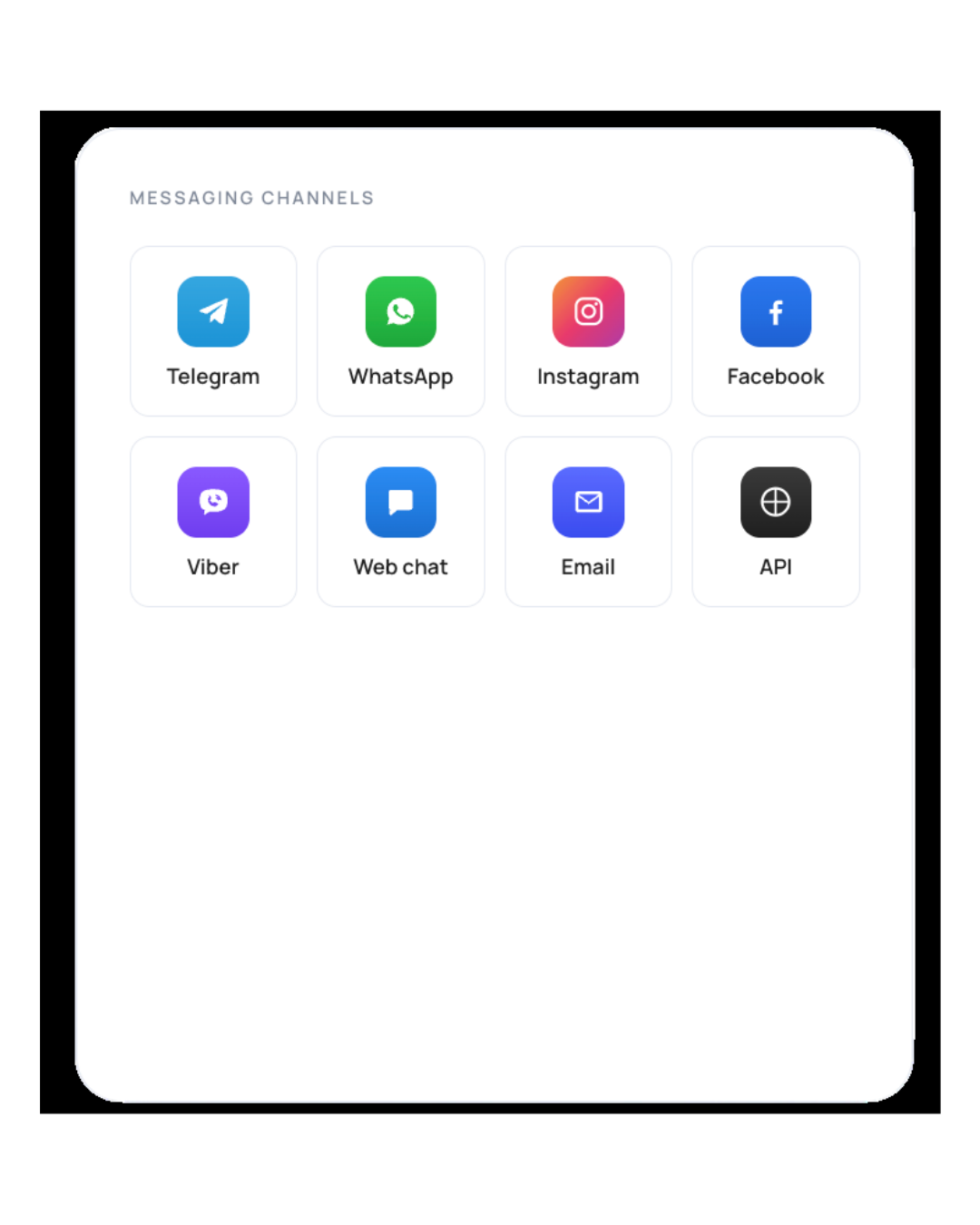
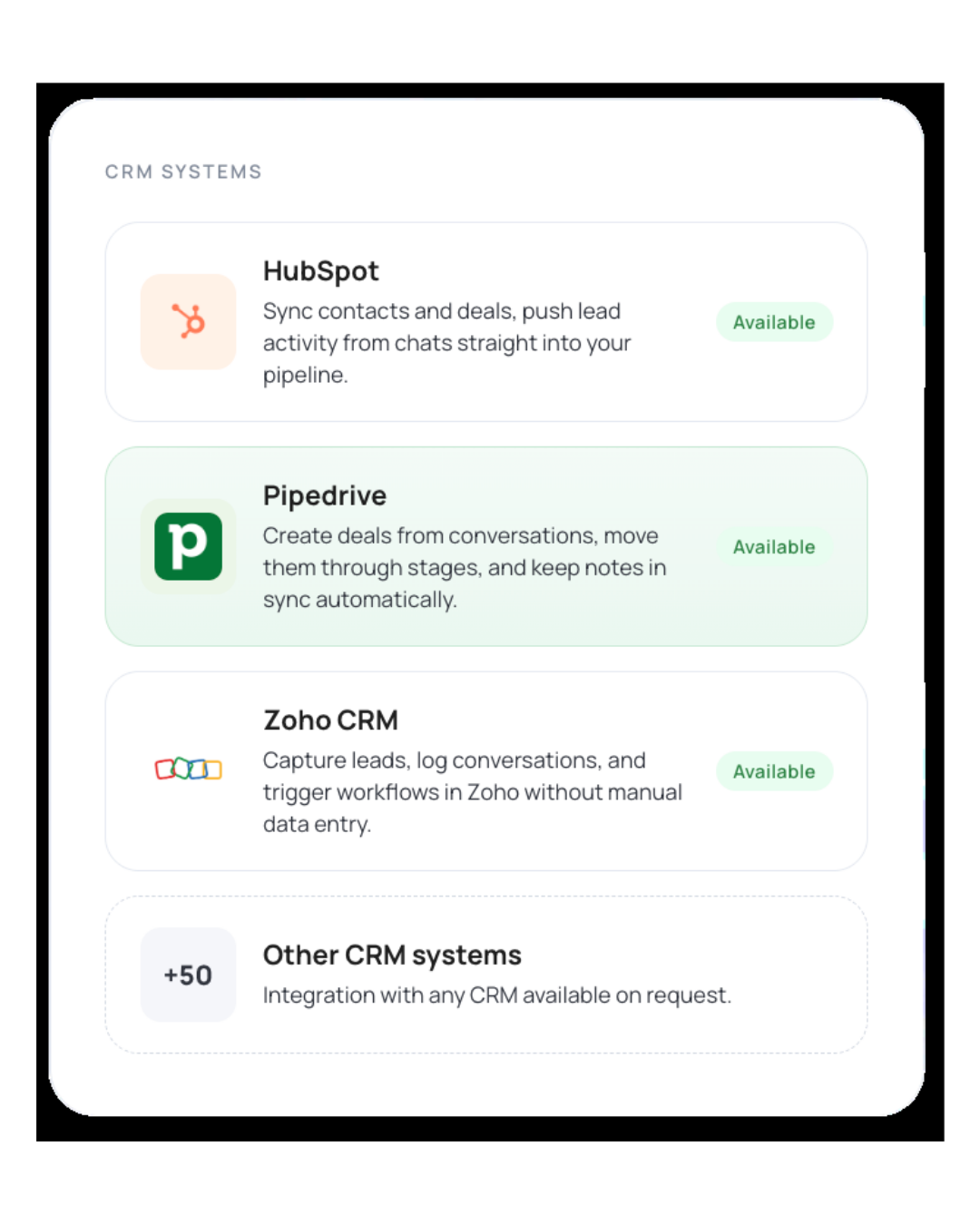
Connect the channels and CRM your team already uses
Skaichat integrates with your current business stack, so your team can keep using the tools they already know.
Dashboard
Monitor key metrics in one place.
Get a real-time view of current activity so your team never misses a customer conversation.
Get a real-time view of current activity so your team never misses a customer conversation.
Live chat volume and statuses
Total leads and new leads today
Conversations waiting for a human agent
Recent conversations and chat history

AI Agents
Create dedicated assistants for different roles and use cases.
Each agent has its own purpose, instructions, knowledge base, and operating rules.
Each agent has its own purpose, instructions, knowledge base, and operating rules.
Sales and lead qualification agent
Customer support agent
Internal knowledge assistant
Training and onboarding assistant

Conversations and operators
Stay in control of every conversation.
Search, filter, pause the AI agent, assign a human operator, and manage the full chat history from one workspace.
Search, filter, pause the AI agent, assign a human operator, and manage the full chat history from one workspace.
Search and filter conversations
Automatically detect when a human agent is needed
Pause the AI agent manually at any time
Access the full conversation history

Documents and knowledge base
Upload your company materials and use them as the foundation for your AI assistant’s responses. Documents can be assigned to specific agents, so each assistant works with the right knowledge for its role.
Supports PDF, DOC, TXT, CSV, and image files
Assign documents to specific AI agents
Define when each source should be used
Turn internal materials into a working knowledge base

Product catalog
Manage your product catalog directly inside the platform. Product data can be used by AI agents during customer conversations, recommendations, and sales consultations.
Add products manually
Import catalogs from CSV files
Store product specifications, parameters, and descriptions
Let AI agents share product photos during conversations

ENTERPRISE

Run Skaichat within your own infrastructure.
On-premise deployment

Connect internal knowledge bases, documents, and company data securely.
Internal documents

Role-based access
Separate user permissions and manage security controls across teams.
On-premise and private cloud deployment for enterprise teams
Skaichat is available not only as a cloud-based SaaS product, but also as an enterprise deployment for companies that require data control, security compliance, and integration with internal systems.

Deploy Skaichat in a dedicated cloud environment controlled by your organization.
Private cloud
Choose the plan that fits your business
Start for free and scale as your team grows.
Free
0 €
month
1
Communication channels
Conversations / month
100
AI agents
1
Try the platform for free
Starter
49 €
month
All
Communication channels
Conversations / month
300
AI agents
Up to 3
For solo entrepreneurs, dental clinics, tutors, and independent service providers.
POPULAR
Growth
179 €
month
All
Communication channels
Conversations / month
1000
AI agents
Up to 10
For beauty salons, retail stores, auto services, clinics, and local businesses with 1–2 locations.
Scale
299 €
month
All
Communication channels
Conversations / month
3000
AI agents
Up to 10
For multi-location businesses, e-commerce teams, and agencies.
Enterprise
Сustom pricing
Unlimited conversations, dedicated account manager, private cloud or on-premise deployment, advanced security controls, and custom integrations.
Flexible pricing model: fixed monthly plan, usage-based pricing, or a hybrid structure. Final terms are discussed individually during the demo.
Included in every plan
Human handoff and conversation transfer
All integrations, documents, and knowledge base features included
PRICING
FAQ
Questions? We’ve got answers.
No. Skaichat is a platform for creating and managing AI agents that work with your documents, data, and connected communication channels.
A conversation is one message thread between a customer and an AI agent within a single customer request. If a customer messages you in the morning and comes back in the evening, that counts as two conversations.
A conversation can include any number of messages from both sides — it still counts as one conversation. A conversation is closed when the customer is inactive for 24 hours, the chat is handed off to a human operator, or the agent’s goal is completed.
This is intentionally different from message-based or token-based pricing. We want pricing to be predictable: 1,000 conversations per month means 1,000 customer requests handled by your AI agent.
A conversation can include any number of messages from both sides — it still counts as one conversation. A conversation is closed when the customer is inactive for 24 hours, the chat is handed off to a human operator, or the agent’s goal is completed.
This is intentionally different from message-based or token-based pricing. We want pricing to be predictable: 1,000 conversations per month means 1,000 customer requests handled by your AI agent.
Each scenario includes human handoff rules. The AI transfers the conversation to a human operator when:
• it cannot find the right answer in the knowledge base after 2–3 attempts
• the customer shows negative emotion
• the customer explicitly asks to speak with a person
• any other rule you define in the scenario
When the conversation is handed off, the operator sees a summary of the entire conversation and the full message history, so the customer does not have to repeat everything from the beginning.
If no operator is connected, the AI sends a polite message such as: “I’ll forward your request to our team, and we’ll get back to you during business hours.”
• it cannot find the right answer in the knowledge base after 2–3 attempts
• the customer shows negative emotion
• the customer explicitly asks to speak with a person
• any other rule you define in the scenario
When the conversation is handed off, the operator sees a summary of the entire conversation and the full message history, so the customer does not have to repeat everything from the beginning.
If no operator is connected, the AI sends a polite message such as: “I’ll forward your request to our team, and we’ll get back to you during business hours.”
The standard setup time is 5–10 minutes. This includes:
• account registration — 2 minutes
• choosing one of 8 ready-made agent goals — 1 minute
• AI-assisted agent setup by voice or text — 2 minutes
• connecting a Telegram bot or WhatsApp channel — 3 minutes
If you need more advanced setup — editing the scenario, adding a knowledge base, or connecting a CRM — it usually takes another 30 minutes to 2 hours.
The agent starts working as soon as the channel is connected. You can test it with internal messages before publishing it.
• account registration — 2 minutes
• choosing one of 8 ready-made agent goals — 1 minute
• AI-assisted agent setup by voice or text — 2 minutes
• connecting a Telegram bot or WhatsApp channel — 3 minutes
If you need more advanced setup — editing the scenario, adding a knowledge base, or connecting a CRM — it usually takes another 30 minutes to 2 hours.
The agent starts working as soon as the channel is connected. You can test it with internal messages before publishing it.
Skaichat is designed to support GDPR-aligned data processing for European and international customers.
Customer data can be stored in EU-based infrastructure, with encryption in transit and at rest, role-based access control, and audit logs for key actions inside the platform.
For enterprise customers, we can provide a Data Processing Agreement, private cloud or on-premise deployment, custom data retention rules, and controlled access to internal documents, conversations, and customer records.
If your company works with sensitive data, regulated industries, healthcare, finance, or enterprise security requirements, we can review the deployment model individually during the demo.
Customer data can be stored in EU-based infrastructure, with encryption in transit and at rest, role-based access control, and audit logs for key actions inside the platform.
For enterprise customers, we can provide a Data Processing Agreement, private cloud or on-premise deployment, custom data retention rules, and controlled access to internal documents, conversations, and customer records.
If your company works with sensitive data, regulated industries, healthcare, finance, or enterprise security requirements, we can review the deployment model individually during the demo.
Yes. You can create separate AI agents for different use cases, teams, and workflows.
For example, you can run one agent for sales qualification, another for customer support, and another for internal knowledge or employee training. Each agent can have its own instructions, connected documents, business logic, and communication channels.
For example, you can run one agent for sales qualification, another for customer support, and another for internal knowledge or employee training. Each agent can have its own instructions, connected documents, business logic, and communication channels.
Yes. Skaichat supports human handoff, so an operator can join the conversation and continue working with the customer manually.
Each of the 8 ready-made agent goals includes built-in handoff rules for common scenarios. By default, the AI hands the conversation over to a human agent when:
• it cannot answer after 2–3 attempts
• the customer shows negative emotion
• the customer explicitly asks to speak with a person
• the request is urgent
You can also define your own handoff rules — for example, “always hand off if the customer mentions an amount above X” or “hand off immediately if the customer is from a VIP segment.”
Handoff works in Instagram, Telegram, WhatsApp, and the website widget. The operator can reply from the Skaichat workspace or from a connected channel.
Each of the 8 ready-made agent goals includes built-in handoff rules for common scenarios. By default, the AI hands the conversation over to a human agent when:
• it cannot answer after 2–3 attempts
• the customer shows negative emotion
• the customer explicitly asks to speak with a person
• the request is urgent
You can also define your own handoff rules — for example, “always hand off if the customer mentions an amount above X” or “hand off immediately if the customer is from a VIP segment.”
Handoff works in Instagram, Telegram, WhatsApp, and the website widget. The operator can reply from the Skaichat workspace or from a connected channel.
Skaichat supports Telegram, WhatsApp, Instagram, Facebook and Viber through Wazzup, as well as integrations with ZohoCRM, Pipedrive.
You can connect customer communication channels and CRM systems so your AI agents can handle conversations, qualify leads, and transfer chats to your team when needed.
You can connect customer communication channels and CRM systems so your AI agents can handle conversations, qualify leads, and transfer chats to your team when needed.
Yes. Skaichat lets you upload PDF, DOC, TXT, CSV, and other files, then assign them to specific AI agents.
This allows each agent to answer questions based on the right documents, knowledge base, product information, policies, or training materials.
This allows each agent to answer questions based on the right documents, knowledge base, product information, policies, or training materials.
Yes. For enterprise customers, Skaichat can be deployed in a private cloud or on-premise environment.
This option is designed for companies with strict requirements for data control, security, internal system integration, compliance, and access management.
This option is designed for companies with strict requirements for data control, security, internal system integration, compliance, and access management.
Yes. Skaichat subscriptions are billed monthly and can be cancelled from your account in one click.
After cancellation, your AI agent will continue working until the end of the paid billing period and then will be paused.
Your data is retained for 90 days, so you can reactivate your account without losing your setup. After 90 days, the data is deleted.
The Free plan does not expire and does not need to be cancelled.
After cancellation, your AI agent will continue working until the end of the paid billing period and then will be paused.
Your data is retained for 90 days, so you can reactivate your account without losing your setup. After 90 days, the data is deleted.
The Free plan does not expire and does not need to be cancelled.
Schedule a demo